The start of the school year used to cost whole days of planning. Now it takes minutes.
Plan a unit, a term or a full year with the Aprendizagens Essenciais — Portugal's national curriculum standards — and Decree-Law 55/2018 already built in.
Scooli plans against the official Portuguese national curriculum — the Aprendizagens Essenciais and Decree-Laws 54/2018 and 55/2018. That specificity is what makes the output usable rather than generic. Other national curricula are on the roadmap.
A real example made in Scooli
Unit plans
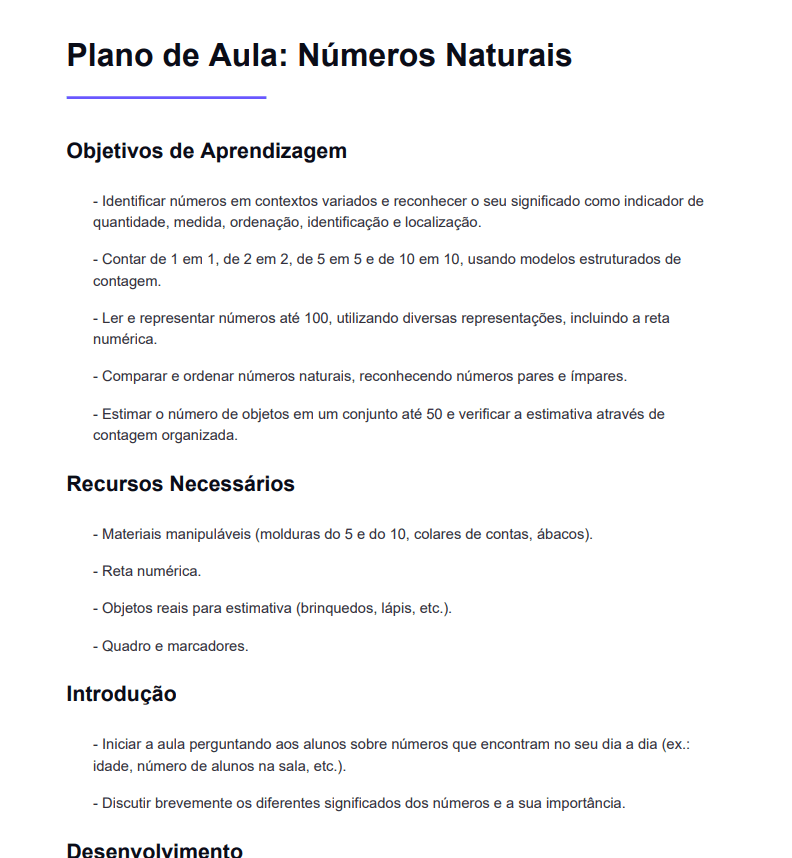
What you get in the generated document
Every document starts from the Portuguese curriculum reference documents and arrives ready to review, edit and use.
Lesson sequence with curriculum descriptors
Decree-Law 55/2018 and curriculum flexibility referenced
Assessment points and instruments
Using unit plans in your week
These are the situations where this tool makes the biggest difference, and what to expect from the result.
What a Scooli unit plan contains
The draft starts from the Aprendizagens Essenciais and Decree-Law 55/2018, so the curriculum work is already done when you open the document.
- Curriculum standards and Student Profile descriptors, cited and put in context
- A lesson sequence where each objective builds on the last
- Formative and summative assessment spread across the unit
How Scooli supports curriculum flexibility
Decree-Law 55/2018 gave Portuguese schools room to adapt sequencing and resources. Scooli helps you document those choices clearly, in a file you can still edit.
- Curriculum management decisions documented in line with Decree-Law 55/2018
- Sequencing adjusted to the class in front of you
- Alternatives generated when the plan changes mid-term
From a request to an editable document
The process is simple: give the context, get a structured draft, and adjust until it is ready to use.
Set the scope
Choose the subject, the year group and the term or unit you are planning.
Describe the class
Add what matters about the group — pace, specific needs or curriculum priorities.
Generate the plan
You get objectives, cited curriculum standards, a lesson sequence and assessment built in.
Refine and hand in
Edit anything, adjust what does not fit and export when the plan is ready to use.
What you get
- Curriculum standards and Student Profile descriptors cited for you, instead of looked up by hand
- A complete unit plan in minutes rather than an evening
- Objectives, sequence and assessment all editable before you hand anything in
The teacher stays in charge
Scooli drafts the base — the teacher decides what stays
Every document is editable before you print, export or share it. The final call belongs to the teacher, not the AI.
Questions about unit plans
Quick answers on what this tool does, how it fits your context and what to expect before you try it.
Keep exploring
Related pages
If you are comparing ways to prepare materials, these pages help you find the right tool faster.
Want to try unit plans in Scooli?
Start for free, generate your first resource and adjust everything before you use, print or export it.